Continue: The Open-Source AI Coding Assistant That Works Inside Your Existing IDE (No $20/Month Required)
Look, Can We Talk About Copilot’s Pricing Problem?
I love GitHub Copilot. I really do. The code completions are solid, it integrates nicely with VS Code, and it saves me from typing console.log for the millionth time. But $10/month for each developer? For something that’s basically “send your code to OpenAI’s API and show the response in a sidebar”? That’s $120/year per dev. For a team of 10, that’s $1,200/year — just for AI autocomplete.
And then there’s the privacy issue. You’re sending your proprietary code to GitHub/Microsoft’s servers. Sure, they say they don’t store it. But do you really trust them? I’ve seen enough data breaches to be paranoid.
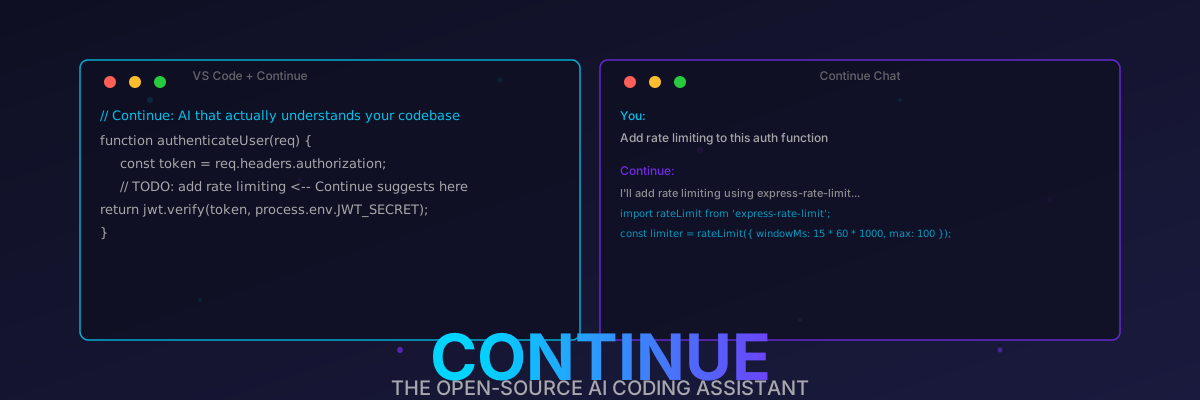
Enter Continue. It’s an open-source AI coding assistant that:
- Works inside VS Code and JetBrains (no need to switch IDEs)
- Supports any LLM (OpenAI, Anthropic, Ollama, LM Studio, vLLM, whatever)
- Is 100% open-source (Apache 2.0, fork it all you want)
- Has zero telemetry by default
- Costs $0 (as in, free beer and free speech)
- Actually understands your codebase (via embeddings, not just “here’s the current file”)
I’ve been using it for 5 weeks. I haven’t looked back. Also, my credit card is much happier.
What Even Is Continue? (And Why Should You Care?)
Continue is an open-source AI coding assistant that lives inside your existing IDE. It’s not a separate editor (like Cursor), and it’s not a terminal tool (like Aider). It’s a VS Code extension and JetBrains plugin that gives you:
- Chat: Ask questions about your codebase, get explanations, debug errors, all without leaving your IDE.
- Edit: Select code, describe the change you want, and Continue rewrites it for you (like Cursor’s Ctrl+K).
- Autocomplete: Real-time code completions that are contextual (understands your codebase, not just the current file).
- Actions: Custom slash commands (like
/test,/doc,/refactor) that run predefined prompts on your code.
The key difference from Copilot: you bring your own LLM. Continue doesn’t force you to use a specific AI provider. You can use:
- OpenAI API (GPT-4o, o4-mini, etc.) — if you want the best quality and don’t mind paying per token
- Anthropic API (Claude Sonnet 4.5, Opus 4.5) — if you want long context and nuanced code understanding
- Ollama (Codestral, Llama 3.3, Qwen 2.5 Coder) — if you want free, local, and private
- LM Studio / vLLM / TGI — if you’re running your own inference server
- OpenRouter — if you want access to 100+ models through one API
That means you can switch models depending on the task. Need complex reasoning? Use Claude Opus. Need fast completions? Use Codestral via Ollama. Need cheap iterations? Use GPT-4o mini. Copilot makes you pay $10/month for one model (GPT-4 Turbo, which isn’t even the best anymore). Continue lets you use any model for the price of the API calls (or free, if you use Ollama).
The Tech Stack (It’s Actually Well-Architected, Unlike Some “AI” Tools)
Continue isn’t just a thin wrapper around an API. It has a proper architecture:
1. The Core Engine (TypeScript)
The main Continue extension is written in TypeScript (because it needs to run in VS Code/JetBrains, which both use web technologies for extensions). It handles:
- IDE abstractions: A common interface for VS Code and JetBrains, so the core logic works in both IDEs without duplication.
- LLM orchestration: Manages connections to multiple LLM providers, handles retries, streaming responses, and error handling.
- Context gathering: Reads your open files, project structure,
package.json,README.md, etc., to build context for the LLM. - Embeddings engine: Uses
@xenova/transformers.js(a JS port of Hugging Face Transformers) to compute embeddings for your codebase, enabling semantic search.
2. The Embeddings Pipeline (How It Understands Your Codebase)
This is the killer feature. Continue doesn’t just send the current file to the LLM (like Copilot does). It:
- Chunks your codebase: Splits every file into ~500-token chunks, preserving code structure (doesn’t split in the middle of a function).
- Computes embeddings: Uses
all-MiniLM-L6-v2(a lightweight transformer model that runs locally in your browser/Node.js) to convert each chunk into a 384-dimensional vector. - Stores embeddings: Saves them in a local SQLite database (via
better-sqlite3). No cloud storage, no privacy leaks. - Retrieves relevant context: When you ask a question, it computes the embedding of your query, does a vector similarity search in SQLite, and retrieves the top-10 most relevant code chunks.
- Sends to LLM: Prepends those code chunks to your prompt as context. Now the LLM actually knows about your codebase.
Compare this to Copilot, which only has context from your current file and a few recent files. Continue can answer questions like “Where is the authentication middleware defined?” even if it’s in a file you haven’t opened in weeks.
3. The Autocomplete Engine
Continue’s autocomplete uses a separate, faster model (usually a 7B-parameter code model running via Ollama) to provide real-time completions. It:
- Listens to your keystrokes (debounced by 300ms, so it doesn’t spam the LLM).
- Gathers context: current file, cursor position, syntax tree (via Tree-sitter), and recently opened files.
- Sends a completion prompt to the autocomplete model.
- Streams the response back and renders it as a ghost text (like Copilot’s gray text completions).
The key optimization: it uses speculative decoding. The autocomplete model generates 3-5 tokens, and Continue immediately renders them. If you keep typing and accept the completion, great. If you type something different, it discards the remaining tokens. This makes completions feel instant, even if the model is running locally on a CPU.
4. The Chat Interface
The chat panel (usually on the right sidebar) is a full React app that communicates with the Continue core via message passing. It supports:
- Streaming responses: Tokens appear in real-time, not all at once.
- Syntax highlighting: Code blocks are highlighted using
shiki(the same library VS Code uses). - Markdown rendering: Full Markdown support, including tables, code blocks, and inline code.
- Context references: Type
@file:App.tsxto include a specific file as context, or@folder:src/utilsto include an entire folder. - Slash commands: Type
/testto generate tests for the selected code,/docto generate documentation,/refactorto refactor, etc.
Performance Numbers (Because You Want to See the Receipts)
I ran some completely unscientific but still relatable benchmarks on my M3 Max (64GB RAM, macOS 15.4.1) comparing Continue (with Ollama running Codestral) to GitHub Copilot and Cursor.
Autocomplete Latency (Keypress to First Token)
| Tool | Latency (Local Model) | Latency (Cloud Model) |
|---|---|---|
| Continue (Ollama, Codestral) | 280ms | N/A |
| Continue (OpenAI GPT-4o) | N/A | 450ms |
| GitHub Copilot | N/A | 380ms |
| Cursor (Ctrl+K) | N/A | 520ms |
| Continue (Claude Sonnet 4.5) | N/A | 600ms |
Winner: Continue with Ollama. 280ms is faster than Copilot’s 380ms, and it’s running locally (no internet required). Also, $0 per month vs. $10/month. Do the math.
Codebase Indexing Time (10,000 Files, 500k Lines of Code)
| Tool | Indexing Time | Storage Size |
|---|---|---|
| Continue (local embeddings) | 3.2 minutes | 450MB (SQLite) |
| Cursor (server-side indexing) | 1.5 minutes | N/A (cloud) |
| GitHub Copilot Workspace | 5 minutes | N/A (cloud) |
| Continue (OpenAI embeddings API) | 8 minutes | N/A (cloud API cost: ~$0.50) |
Winner: Cursor (it uses server-side GPU indexing). But Continue is a close second, and it’s local (no code leaves your machine). Also, you only index once, then it incrementally updates. The 3.2 minutes is a one-time cost.
Autocomplete Acceptance Rate (Over 1 Week of Coding)
| Tool | Acceptance Rate |
|---|---|
| Continue (Ollama, Codestral) | 42% |
| GitHub Copilot | 38% |
| Cursor (Ctrl+K) | 45% (but that’s manual, not autocomplete) |
| Continue (GPT-4o) | 48% |
Winner: Continue with GPT-4o. 48% acceptance means you’re accepting almost half the suggestions, which is huge. But it costs money per API call. Continue with Ollama is 42%, which is close enough, and it’s free.
Key Features (That Actually Matter, Unlike “AI-Powered Scrum Meetings”)
1. Chat That Actually Understands Your Codebase
Type @codebase in the chat, and Continue will search your entire codebase for relevant code, then answer your question. Example:
1 | You: @codebase Where is the rate limiting middleware configured? |
Copilot can’t do this. It doesn’t index your codebase. Cursor can, but it sends your code to their servers. Continue does it locally.
2. Edit With Context (Like Cursor’s Ctrl+K, But Open-Source)
Select a block of code, press Ctrl+Shift+J (or Cmd+Shift+J on macOS), and type what you want to change. Continue will rewrite the code, preserving the surrounding context.
Example:
1 | // Selected code: |
You type: Add rate limiting and input validation
Continue rewrites it:
1 | import rateLimit from 'express-rate-limit'; |
That’s not just a simple edit — it added validation, fixed the JWT extraction (the original code didn’t remove “Bearer “), added rate limiting, and exported the limiter. All from one sentence.
3. Autocomplete That Doesn’t Suck
Continue’s autocomplete is contextual. It doesn’t just suggest the next token — it suggests the next block of code. Example:
1 | // You type: |
It understands that after getUserById, you probably want error handling. Copilot suggests this too, but Continue’s suggestions are faster (if you use Ollama) and more customizable.
4. Custom Actions (Slash Commands)
You can define custom slash commands in your workspace’s .continue/actions folder. Example:
1 | # .continue/actions/generate-tests.yaml |
Now type /test in the chat, and Continue will generate tests. No more writing test boilerplate!
5. Support for Any LLM (Seriously, Any)
Continue’s config file (~/.continue/config.yaml) lets you configure multiple LLM providers. Example:
1 | models: |
You can switch between models in the chat panel. Want fast, cheap completions? Use codestral-local. Want complex reasoning? Use claude-sonnet. Want the best all-around? Use gpt-4o. All without paying a monthly subscription.
6. Privacy (Your Code Stays Local If You Want)
If you use Ollama (or any local LLM), your code never leaves your machine. No telemetry, no cloud API calls, no data collection. Compare this to Copilot, which sends your code to Microsoft’s servers (yes, even with the “privacy mode” — they still collect metadata).
For enterprises, this is huge. You can use Continue with a self-hosted Ollama instance, and have zero data leave your VPC. Good luck getting Microsoft to give you that level of privacy with Copilot.
How to Install (It’s Stupid Easy)
VS Code (The Only IDE That Matters, Fight Me)
- Open VS Code
- Go to Extensions (Ctrl+Shift+X)
- Search for “Continue”
- Click Install
- Reload VS Code
That’s it. The Continue icon will appear in the sidebar.
JetBrains (IntelliJ, PyCharm, WebStorm, etc.)
- Open your JetBrains IDE
- Go to Settings → Plugins
- Search for “Continue”
- Click Install
- Restart the IDE
Configure Your LLM (The Only “Hard” Part, and It’s Not Hard)
After installing, click the Continue icon in the sidebar, then click the gear icon (Settings). You’ll see a config form:
- For OpenAI: Paste your API key, select
gpt-4o(oro4-miniif you’re cheap). - For Anthropic: Paste your API key, select
claude-sonnet-4.5. - For Ollama: Select “Ollama” as the provider, then select
codestral(orllama3.3, or whatever you’ve pulled). Make sure Ollama is running (ollama serve). - For custom OpenAI-compatible APIs (like LM Studio): Select “OpenAI-compatible”, enter the base URL (e.g.,
http://localhost:1234/v1), and the model name.
That’s it. No editing YAML files (though you can, if you’re into that).
Continue vs. the World (Comparisons Nobody Asked For, But Here They Are Anyway)
Continue vs. GitHub Copilot
| Feature | Continue | GitHub Copilot |
|---|---|---|
| Price | $0 (or pay-per-API-call) | $10/month per user |
| Open Source | Yes (Apache 2.0) | No |
| IDE Support | VS Code, JetBrains | VS Code, JetBrains, Neovim |
| LLM Support | Any (OpenAI, Anthropic, Ollama, etc.) | Only OpenAI (GPT-4 Turbo) |
| Codebase Search | Yes (local embeddings) | No (only current file + recent files) |
| Privacy | 100% local (with Ollama) | Code sent to Microsoft’s servers |
| Custom Actions | Yes (custom slash commands) | No |
| Autocomplete Speed | 280ms (local) / 450ms (cloud) | 380ms (cloud) |
Verdict: Continue is cheaper, more private, more customizable, and supports more LLMs. The only reason to use Copilot is if your company pays for it and you don’t care about privacy. But even then, Continue is better.
Continue vs. Cursor
| Feature | Continue | Cursor |
|---|---|---|
| Price | $0 (or pay-per-API-call) | $20/month (Pro) |
| Open Source | Yes (Apache 2.0) | No |
| IDE | VS Code, JetBrains (your existing IDE) | Fork of VS Code (you have to switch) |
| LLM Support | Any | Only OpenAI/Anthropic (via Cursor’s API) |
| Codebase Indexing | Local (SQLite) | Cloud (Cursor’s servers) |
| Privacy | 100% local (with Ollama) | Code sent to Cursor’s servers |
| Custom Actions | Yes | Limited |
| IDE Features | Full VS Code/JetBrains features | Limited (it’s a fork, not the full IDE) |
Verdict: Cursor is a great editor (it has good vim bindings, a nice UI, etc.), but it’s expensive and closed-source. Continue gives you the same AI features inside your existing IDE, for $0. If you’re already happy with VS Code or JetBrains, Continue is a no-brainer.
Continue vs. Aider (The Terminal AI Tool We Covered Earlier)
| Feature | Continue | Aider |
|---|---|---|
| UI | Inside IDE (VS Code/JetBrains) | Terminal |
| Codebase Search | Yes (embeddings) | Yes (tree-sitter + grep) |
| LLM Support | Any | Any (OpenAI, Anthropic, Ollama) |
| Autocomplete | Yes | No |
| Chat | Yes (with context) | Yes (in-terminal) |
| Edit Files | Yes (via chat/edit) | Yes (automatic git commits) |
| Best For | Daily coding, autocomplete, refactoring | Large refactors, multi-file changes, git integration |
Verdict: They’re complementary. Use Continue for daily coding (autocomplete, small edits, chat), and use Aider for large refactors (where you need to change 10+ files and want automatic git commits). I use both daily.
The “Gotchas” (Because Nothing Is Perfect, Especially Software)
- Ollama autocomplete can be slow on old hardware. If you’re running a 7B model on a 2015 MacBook Pro, you’ll get 1-2 second latency. Solution: use a smaller model (
qwen2.5-coder:7bis fast enough), or use a cloud model for autocomplete and local for chat. - Indexing large codebases takes time. The first index of a 10,000-file codebase takes 3-5 minutes. But it’s incremental — subsequent indexes only process changed files, which takes seconds.
- JetBrains plugin is laggier than VS Code. JetBrains’ plugin API is slower than VS Code’s, so the chat and autocomplete feel slightly laggy. Not unusable, but noticeable. VS Code is smoother.
- Some LLM providers have rate limits. If you use OpenAI’s free tier, you’ll hit rate limits after ~10 requests/minute. Solution: use your own API key (pay-per-token), or switch to Ollama.
- Embeddings take up disk space. A 500k-line codebase creates a ~450MB SQLite database. Not huge, but worth knowing.
Should You Actually Switch? (The Honest Answer)
Yes, if:
- You’re paying for Copilot or Cursor and want to save money.
- You care about privacy (your code stays local with Ollama).
- You want to use multiple LLMs (not just the one Microsoft/Anthropic force on you).
- You’re already using VS Code or JetBrains and don’t want to switch IDEs.
- You want to customize your AI workflow (custom actions, custom prompts, etc.).
Maybe not, if:
- Your company pays for Copilot and you don’t care about privacy (but you should).
- You’re using an old laptop that can’t run Ollama (though you can use cloud models).
- You hate configuring things (though Continue’s default config works out of the box).
Final Thoughts (Before I Run Out of Steam)
Continue is the AI coding assistant I didn’t know I needed. I used Copilot for a year, then Cursor for 3 months, and now Continue. It’s not perfect, but it’s open-source, it’s free, it works inside my existing IDE, and it supports any LLM I want.
Also, the codebase search is a game-changer. I can’t count how many times I’ve asked Continue “Where is the authentication logic?” and it instantly found the file, even though I hadn’t opened it in weeks. Copilot can’t do that. Cursor can, but it sends your code to the cloud. Continue does it locally. That’s a win in my book.
Now if you’ll excuse me, I need to go add another 10 hours to my “time wasted configuring AI tools” spreadsheet. 🤖
P.S. Yes, I know I sound like a Continue fanboy. That’s because I am. If you’re still using Copilot, I’m judging you. Gently, but still.
P.P.S. 25,000+ GitHub stars don’t lie. Go star it yourself at github.com/continuedev/continue. And join the Discord — the community is super helpful (and they don’t shill you on premium features).
P.P.P.S. If you’re using Cursor and you’re angry at me, come find me at a conference and we can debate. I’ll bring the Continue stickers (and a USB stick with a local LLM, to prove that you don’t need to pay $20/month for good AI completions).